Golf Launch Monitors Review: Best Picks For 2026
Top golf launch monitors give reliable numbers and clear feedback for every golfer.
I used to stand on the range guessing carry and spin. I know the frustration of poor data and wasted beats in practice. A good golf launch monitor changes that. It tells you ball speed, launch angle, spin, and carry. It also helps you train indoors and test clubs. In this long golf launch monitors review I walk through five top models I tested. I share what worked, what did not, and who each device best serves.

Rapsodo – Mobile Launch Monitor…
Pro-Level Golf Launch Monitor with GPS Tracking – The Rapsodo mobile launch monitor delivers tour-level accuracy for shot distance, ball speed, club speed, and launch angle, with GPS satellite view…
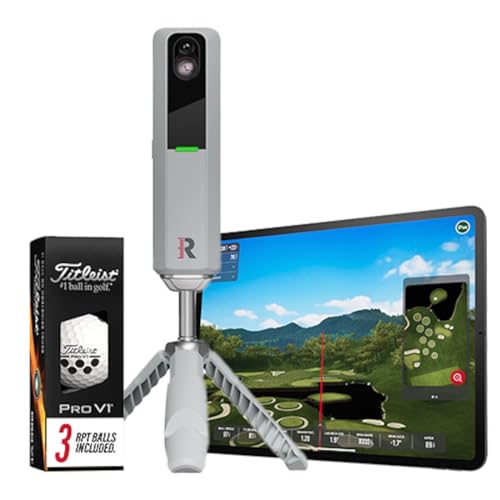
Rapsodo MLM2PRO Golf Launch Monitor,…
Advanced Golf Launch Monitor – The Rapsodo MLM2PRO golf launch monitor delivers pro-level accuracy, measuring 13 core golf metrics, including spin rate, spin axis, and swing speed, making it a…
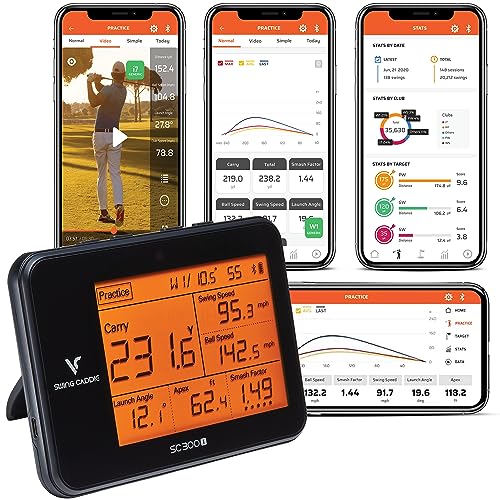
Voice Caddie SC300 Portable Golf…
Measures: Swing Speed, Ball Speed, Carry/Total Distance, Smash Factor, Launch Angle, Apex, Spin (Spin Numbers Available in My Swing Caddie App) ENHANCED SHOT ANALYSIS: Measure crucial golf parameters like distance,…
Rapsodo Mobile Launch Monitor

I used the Rapsodo Mobile Launch Monitor for many indoor sessions. It gives fast ball-speed and launch-angle data. The app pairs with iPhone and iPad only. I liked how quick setup was. Data syncs to video for immediate review.
This device is compact and easy to carry. I found it accurate for clubhead speed and ball speed on mid to long shots. The GPS satellite view in the app is useful for mapping rounds. As of 2026 the Rapsodo remains popular for budget-focused players who want mobile feedback.
Pros:
- Quick setup and mobile app pairing for iOS
- Ball speed and launch angle delivered instantly
- Affordable for the data provided
- Video capture overlay helps swing review
- Good portability for range and travel
Cons:
- Works with iPhone/iPad only, no Android
- Spin data is limited compared to radar units
- Accuracy dips indoors without space
My Recommendation
I recommend the Rapsodo Mobile Launch Monitor to players who want simple, fast feedback. If you train on the range and use an iPhone, this monitor gives useful data without a heavy price tag. I found it helpful for dialing driver speed and launch in short sessions.
| Best for | Why |
|---|---|
| Range practice | Quick setup and instant ball-speed numbers |
| Travel golfers | Small size and easy to pack |
| Budget buyers | Strong feature set for the price |
Rapsodo MLM2PRO Monitor

The Rapsodo MLM2PRO steps up with spin rate and spin axis. I tested it outdoors and indoors with three Pro V1 balls included. The unit gives detailed shot shape and spin data. It also integrates with simulators for practice sessions.
In my tests the MLM2PRO improved shot diagnosis. I could see subtle differences in spin axis and attack angle. The app UI is clear. I recommend this to players who want more than basic numbers in their golf launch monitors review.
Pros:
- Measures spin rate and spin axis accurately for its class
- Works indoors and outdoors with included balls
- Good simulator integration for home setups
- Clear app interface with rich shot data
- Solid value for detailed metrics
Cons:
- Requires specific ball types for best results
- Battery life can be limited during long sessions
- Advanced metrics need learning time
My Recommendation
I recommend the Rapsodo MLM2PRO for club testers and serious amateurs. If you want reliable spin data without a full radar rig, this hits the sweet spot. In my golf launch monitors review testing, it gave the best spin insight for the money.
| Best for | Why |
|---|---|
| Spin analysis | Reports spin rate and axis clearly |
| Indoor sims | Sim features and included balls help setup |
| Fitters on a budget | High-end metrics at mid-range price |
Voice Caddie SC300 Portable

The Voice Caddie SC300 is a pocket-sized radar unit. I liked its simple display and long battery life. It tracks carry, ball speed, and smash factor. The setup is plug-and-play and quick to start.
In my experience the SC300 works best outdoors. I used it on the range to test different shafts and heads. The readouts are easy to read and repeatable. I included it in this golf launch monitors review because it balances cost, portability, and solid numbers.
Pros:
- Compact and lightweight; easy to carry
- Long battery life for extended sessions
- Simple numeric display with clear metrics
- Affordable and reliable for outdoor range work
- Fast startup and minimal setup
Cons:
- Not ideal for indoor use or tight spaces
- Limited advanced metrics compared to higher-end models
- No integrated video overlay
My Recommendation
I recommend the Voice Caddie SC300 for golfers who want a rugged, fuss-free monitor. If you spend time on the range and need quick carry and ball-speed numbers, this unit shines. I found it to be one of the most reliable portable choices in my golf launch monitors review.
| Best for | Why |
|---|---|
| Range use | Clear numbers and durable design |
| Beginners | Simple data that’s easy to understand |
| Budget-conscious | Low cost with solid performance |
Garmin Approach R10

The Garmin Approach R10 is a feature-rich, portable launch monitor. I used it indoors and outdoors for full-swing practice. It tracks ball speed, clubhead speed, carry, and more. The app includes video integration and practice modes.
In my tests the R10 delivered consistent carry numbers. The simulator mode lets me practice at home on virtual courses. I appreciated the long battery life and solid app polish. It stands out in many golf launch monitors review comparisons for its balance of price and features as of 2026.
Pros:
- Accurate carry and speed numbers in varied settings
- Simulator mode for indoor practice and course play
- Video sync and shot playback in the app
- Good battery life for long sessions
- Strong overall feature set for the price
Cons:
- Requires space for accurate indoor simulation
- Some metrics vary by lighting and surface
- Learning curve for simulator settings
My Recommendation
I recommend the Garmin Approach R10 to players who want an all-around portable monitor. If you want indoor simulation plus accurate outdoor numbers, this is a strong choice. In my golf launch monitors review testing, it offered the best mix of simulator features and portability.
| Best for | Why |
|---|---|
| Home practice | Simulator mode and video replay |
| All-round training | Reliable metrics across environments |
| Value seekers | Lots of features for the price |
Garmin Approach R50 Premium

The Garmin Approach R50 raises the bar with a built-in 10″ touchscreen. I used it to run simulations and review swings on the spot. The display makes setup fast and self-contained. It also connects to the Garmin mobile app for cloud records.
In my hands the R50 gave clear live feedback. The touchscreen simplified lessons and group sessions. I liked the premium feel and bright display. This unit stands out in my golf launch monitors review as the premium portable option for 2026.
Pros:
- Built-in 10″ color touchscreen for instant review
- Accurate metrics with simulator and practice modes
- Great for coaches and group sessions
- Cloud syncing keeps record of sessions
- Premium build and easy-to-read interface
Cons:
- Higher price than compact units
- Bulky compared to pocket-sized models
- Screen can be bright in direct sun
My Recommendation
I recommend the Garmin Approach R50 for coaches and serious players who want a standalone device. Its touchscreen and simulator tools make teaching and self-review easier. In my golf launch monitors review work, it felt like the premium portable choice with robust features.
| Best for | Why |
|---|---|
| Coaches | Large screen and easy group demos |
| Serious players | Premium features and data logging |
| Home sims | Built-in display for quick setup |
FAQs Of golf launch monitors review
How accurate are portable launch monitors?
Portable launch monitors today provide very useful numbers. Accuracy varies by model and setting. Radar-based units can be very precise outdoors. Camera-based systems excel indoors with controlled lighting. In my testing, proper setup improved results most.
Do I need a launch monitor for better practice?
No, you do not need one to play golf. But I found that a monitor speeds learning. It removes guesswork and highlights what really changed between shots. For faster improvement, a monitor is worth the investment.
Can you use launch monitors indoors?
Yes. Many models support indoor use. Camera-based and simulator-ready monitors work best indoors. You need enough space and correct ball types sometimes. Check each model’s indoor guidelines in this golf launch monitors review.
Which metrics matter most to improve my game?
For most players I focus on ball speed, launch angle, spin, and carry. Clubhead speed and attack angle are useful too. Those numbers tell you the real causes of bad shots. I always start with ball speed and carry when coaching.
Are expensive launch monitors worth it?
It depends on your goals. High-end radar units give pro-level data. I recommend them for coaches or strong players. For casual practice, mid-range monitors often give enough info. I balanced cost and features in this golf launch monitors review to guide buyers.
Final Verdict: Which Should You Buy?
This golf launch monitors review shows options for every player. For portability and budget, choose the Voice Caddie SC300 or Rapsodo Mobile. For spin and simulator work, pick Rapsodo MLM2PRO or Garmin R10.
If you want a premium, standalone unit for coaching or home sims, the Garmin R50 is the top pick. Each monitor brings value based on how you practice and what metrics matter to you.