Best Golf Simulator Setup For Home: Ultimate Guide
Best all-in-one home golf simulator combines SkyTrak ST MAX, a solid enclosure, and a durable mat.
Picture this: you want to practice rain or shine, but driving to the range eats time and money. I built a home setup that fits my garage, captures real ball flight, and protects walls. With the right kit—enclosure, launch monitor, screen, projector, and mat—you can get tour-quality practice without leaving home. Below I break down the best golf simulator setup for home, showing what to buy, why it matters, and who each option is for.
Complete 10×8 Enclosure Package

I like this complete golf simulator enclosure package because it gives you a turnkey frame, blackout curtain, and impact screen sized for a 10×8 foot space. Setup is straightforward and the kit keeps errant balls contained. The impact screen feels dense and shows projector images clearly, even in low-light garages.
For me, reliable ball containment is key. This enclosure includes shank nets for side protection and a back panel for missed shots. If you plan to pair it with a mid-range launch monitor, this package handles the impact and visual needs well.
Pros:
- Full 10×8 footprint fits most single-car garages
- Durable HD impact screen for clear projection
- Blackout curtain improves image contrast
- Includes shank nets to protect frame and walls
- Relatively quick to assemble with clear instructions
- Reasonable price for a full enclosure package
Cons:
- Requires a bit of ceiling height for driver shots
- Frame hardware may need occasional tightening
- Projector not included in kit
My Recommendation
This enclosure is best for golfers who want a no-fuss, high-value home impact screen and cage. I recommend it if you have a 10×8 bay and plan to add a separate launch monitor and projector. The build quality and included blackout curtain make it an excellent base for the best golf simulator setup for home without overspending.
| Best for | Why |
|---|---|
| Garage setups | Fits single-car spaces and offers full coverage |
| Budget builders | All-in-one kit saves time and cost |
| Beginner sim users | Simple assembly and reliable screen |
Premium 10×8 Enclosure Kit
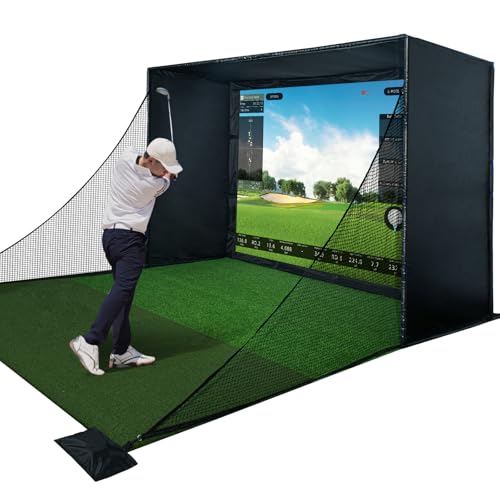
This premium enclosure kit ups the safety with full padding and a thicker impact screen to reduce bounceback and vibration. I found the padded sides make indoor practice feel more secure, especially when experimenting with different clubs. The blackout curtain is stitched with care and helps projector brightness pop.
It pairs well with high-end launch monitors because the screen surface has better reflectivity for simulated ball flight. Assembly took me a couple of hours but the sturdy tubing and clear labels made the process tidy. If you value safety and image clarity, this kit is a solid core of the best golf simulator setup for home.
Pros:
- Thicker impact screen reduces bounce and wear
- Full safety padding protects frame and walls
- Great contrast for projector images
- Designed for compatibility with common launch monitors
- Durable stitching and reinforced corners
- Cleaner, more professional look in a home setup
Cons:
- Heavier materials require two people to assemble
- Higher price than basic enclosures
- Still needs a separate projector and monitor
My Recommendation
I recommend this kit for golfers who prioritize safety, image quality, and long-term durability. I used it in my garage and noticed less wear after months of practice. For builders aiming for the best golf simulator setup for home with a semi-pro feel, the added padding and screen quality make it worth the premium.
| Best for | Why |
|---|---|
| Serious practice | Sturdy screen and padding support frequent use |
| Families | Added padding protects kids and pets |
| High-contrast projection | Improves simulator visuals |
PHIGOLF Home Simulator

The PHIGOLF system is a compact, sensor-based simulator that tracks club motion and provides 3D analysis without requiring a full enclosure. I like it because I can practice swing mechanics in my living room and review the data instantly. Its portability makes it ideal for trips and quick practice sessions.
It won’t replace a launch monitor for precise ball-flight numbers, but it excels for swing training and tempo work. I often pair it with a net and mat for a minimal swing area setup. For golfers seeking a lightweight, budget-friendly component of the best golf simulator setup for home, PHIGOLF is an excellent training tool.
Pros:
- Highly portable and easy to set up
- Accurate swing motion and 3D analysis
- No need for impact screens or large spaces
- App-driven drills and feedback
- Affordable compared to full launch monitors
- Great for tempo and swing path work
Cons:
- Does not capture true ball flight metrics
- Requires a compatible smartphone or tablet
- Limited realism compared to launch monitors
My Recommendation
I recommend PHIGOLF to travel golfers and those who want to improve swing mechanics without a full simulator. I use it for short sessions when I can’t access my garage sim. It makes a fine component in a layered approach to the best golf simulator setup for home—use it for swing work, then move to a launch monitor for ball data.
| Best for | Why |
|---|---|
| Travel practice | Compact and easy to carry |
| Swing drills | Provides detailed motion analysis |
| Budget trainers | Low cost with strong app features |
SkyTrak ST MAX Studio Package

The SkyTrak ST MAX studio package is a high-end, integrated solution that includes a launch monitor, mat, screen, enclosure, projector, and trial software. I chose SkyTrak for its reliable ball-flight data and software ecosystem. The ST MAX model improves connectivity and realism for club and ball metrics.
Installation requires planning—clear ceiling height, projector mount, and a solid mat are essential. Once set up, the system delivers consistent, repeatable data that I trust for game improvement. If you want the most complete single purchase for the best golf simulator setup for home, SkyTrak ST MAX is my go-to recommendation.
Pros:
- All-in-one studio package reduces shopping complexity
- Accurate ball-speed and launch data
- Integrated trial software for many courses
- Good projector and mat included for immediate use
- Strong customer support and firmware updates
- Solid community and software ecosystem
Cons:
- Higher upfront cost than piecemeal options
- Needs a dedicated space with ceiling clearance
- Some advanced features require subscription
My Recommendation
I recommend SkyTrak ST MAX to golfers who want a near-turnkey, accurate setup that serves both practice and entertainment. I installed this in my garage and got meaningful numbers on ball speed, launch, and spin. For anyone building the best golf simulator setup for home who wants reliability and compatibility, this package is a wise investment.
| Best for | Why |
|---|---|
| Serious practice | Accurate metrics and software options |
| Complete builders | Includes projector, mat, and screen |
| Long-term use | Ongoing updates and community support |
Golf Daddy AI Swing Trainer

Golf Daddy brings AI swing analysis and a no-ball practice mat that gives real-time feedback on tempo and hand path. I tested it for short sessions and appreciated the instant cues that help ingrain better mechanics. It works well both indoors and outdoors and is very portable.
While it doesn’t replace a launch monitor for ball-flight data, I use it to warm up and fix swing faults. It fits neatly into the best golf simulator setup for home as an affordable tech add-on that accelerates progress between fuller simulator sessions.
Pros:
- AI-driven feedback helps correct swing faults
- No ball practice reduces risk indoors
- Portable and usable outside a garage
- Quick setup and app guidance
- Affordable and complements launch monitors well
- Great for short, focused practice sessions
Cons:
- Not a substitute for true ball-flight data
- App accuracy varies with phone camera quality
- Limited to swing mechanics training
My Recommendation
I recommend Golf Daddy for golfers who need an affordable, tech-forward practice aid. I keep mine next to the simulator and use it for warm-ups and targeted drills. It’s a practical component when building the best golf simulator setup for home because it boosts swing quality between full simulation sessions.
| Best for | Why |
|---|---|
| Warm-ups | Fast feedback to prepare before full sessions |
| Swing fixers | AI cues to correct motion |
| Portable users | Easy to carry to the range or backyard |
Home Garage Simulator Enclosure

This enclosure is a no-frills, cost-effective structure for indoor practice that prioritizes footprint and easy fit. I appreciate its value for entry-level builders. The screen material is good enough for casual projection and repeated use.
It’s a sensible starting point for anyone assembling the best golf simulator setup for home on a tighter budget. Add a decent mat and a mobile launch monitor and you’re set for consistent practice sessions without breaking the bank.
Pros:
- Affordable and straightforward
- Compact design for small garages
- Easy replacement parts and netting
- Good projection surface for casual use
- Quick assembly for most users
Cons:
- Less padding than premium kits
- May need reinforcement for heavy hitters
- Not optimized for professional-grade projectors
My Recommendation
I recommend this enclosure for golfers who want a solid starter system without splurging. I used it as a temporary setup and found it reliable for light to moderate practice. For the best golf simulator setup for home on a budget, pair this with a portable launch monitor and a quality mat.
| Best for | Why |
|---|---|
| Budget builders | Low-cost entry into simulator practice |
| Small spaces | Compact footprint fits tight garages |
| Casual users | Good for weekend practice sessions |
Rapsodo MLM2PRO Launch Monitor

The Rapsodo MLM2PRO is a mobile launch monitor offering strong camera and radar fusion for realistic ball-flight snapshots. I find it very useful for on-the-go testing and for use inside a garage simulator. The app gives club and ball metrics and integrates into many simulation platforms.
Its portability and accuracy strike a good balance for most golfers building the best golf simulator setup for home. Load a short software package and you can play courses, do practice ranges, or record sessions quickly. I trust Rapsodo data for club fitting and regular practice checks.
Pros:
- Mobile and easy to position
- Strong data fusion for accurate reads
- Good app UX with video capture
- Plays well with many simulator software platforms
- Fast setup and reliable indoors
Cons:
- Requires clear sightlines for best accuracy
- Higher cost than basic mobile monitors
- Subscription may be needed for full features
My Recommendation
I recommend the Rapsodo MLM2PRO to golfers who want portable, high-quality data for both indoor and outdoor use. I use it for quick checks and club fitting sessions in my simulator bay. It’s a critical component when you aim to build the best golf simulator setup for home with mobile flexibility and robust metrics.
| Best for | Why |
|---|---|
| Portable testing | Easy to move between spaces |
| Data-driven users | Accurate reads for coaching and fitting |
| Mixed use | Works indoors and outdoors |
GoSports 10×6 Elite Mat

A good hitting mat is the unsung hero of a home simulator. The GoSports 10×6 Elite mat offers a 15 mm surface that feels close to a real turf lie and absorbs shock well. I use this mat in my setup to protect floors and to provide a true-to-life stance and ball lie.
Its size gives room for different foot positions and shots, and the dense rubber base keeps the mat stable during full swings. For anyone assembling the best golf simulator setup for home, investing in a quality mat like this improves both comfort and durability significantly.
Pros:
- 15 mm thick turf gives realistic feel
- Large 10×6 size for full-swing comfort
- Shock-absorbing base protects floors
- Durable construction for frequent use
- Good value compared to custom mats
- Easy to clean and store
Cons:
- Not a built-in tee system for every mat
- Edges may curl without weight
- Does not include a foam rubber insert for impact (sold separately)
My Recommendation
I recommend the GoSports Elite mat to anyone who wants realistic feel and reliable longevity in their simulator bay. I feel the added thickness reduces shock and mimics a turf strike well. For the best golf simulator setup for home, a mat this size and quality makes a big difference in daily comfort and performance.
| Best for | Why |
|---|---|
| Comfort seekers | Thicker turf reduces strain and shock |
| Full-swing practice | Large surface supports all clubs |
| Value buyers | Strong feel without custom cost |
FAQs Of best golf simulator setup for home
What space do I need for the best golf simulator setup for home?
Plan for at least 10 feet wide, 8–10 feet deep, and 9–10 feet high for driver shots. Taller ceilings improve realism. Measure your garage or room and leave clearance for projectors and mounting.
Do I need a launch monitor to get realistic data?
Yes, a launch monitor like SkyTrak or Rapsodo gives accurate ball and club metrics. Sensor-only systems like PHIGOLF help swing mechanics, but they won’t fully replace ball-flight numbers needed for fitting and detailed practice.
Which is better: projector-based or TV-based simulator?
Projectors deliver a life-size image and immersive feel for courses. A large TV works for small spaces but reduces immersion. I prefer a projector for the best golf simulator setup for home if space and light control allow it.
How much should I expect to spend on a good home simulator?
Budget builds can start around $1,000 with basic enclosure, net, and mobile launch monitor. Mid-range setups with quality launch monitors, mats, and screens often run $3,000–$8,000. High-end, studio-grade systems exceed $10,000. I advise balancing accuracy and budget for your goals.
Can I use my simulator year-round?
Yes. With proper ventilation, lighting control, and climate considerations, a home simulator works year-round. I maintain my mat and screen and check electronics seasonally to ensure long-term use.
Final Verdict: Which Should You Buy?
For the most complete and reliable option, the SkyTrak ST MAX studio package stands out as the best golf simulator setup for home due to its accuracy and bundled components. It balances realism, software options, and long-term value.
If you want a budget-friendly start, pair a solid enclosure, the GoSports mat, and a mobile launch monitor to build a practical home system. That approach gives flexibility while keeping quality high.