Best Golf Analysis Software: Top Tools For Better Swing
V1 Golf Analysis Software
Video swing analysis and coach tools for golfers

Overview
V1 Golf Analysis software gives clear video tools for swing review and coaching. It records swings, adds side-by-side comparisons, and slows video for detailed study. The interface stays simple so golfers focus on change, not menus.
I like the frame-by-frame playback and drawing tools. Coaches use it for instant feedback. V1 helps me spot tempo and plane issues fast. It pairs well with launch data and other best golf analysis software solutions. The learning curve is low. It fits phones, tablets, and laptops for practice and lesson reviews.
Advantages
- Clear side-by-side video comparison
- Slow motion and frame-by-frame playback
- Easy drawing and voice-over tools
- Widely used by coaches and instructors
- Compatible with phones, tablets, and desktops
Limitations
- No built-in launch monitor data
- Subscription needed for cloud features
- Limited simulator integration
Our Recommendation
I recommend V1 Golf Analysis Software for coaches and serious amateurs who want video-first feedback. It pairs well with launch monitors and other best golf analysis software. The value is strong for lessons and focused practice. Availability is broad and setup is straightforward.
Best Use Cases
| Best for | Why It Works |
|---|---|
| Swing lessons | Record and review swings during lessons |
| Player practice | Self-coaching with video comparison |
| Coach clinics | Quick feedback for groups |
Rapsodo MLM2PRO Launch Monitor
Mobile launch monitor that captures spin, axis and swing metrics

Overview
Rapsodo MLM2PRO is a compact launch monitor for home, range, and indoor use. It measures ball speed, spin rate, spin axis, launch angle, and more. The unit links to an app for instant shot maps and club tracking.
I like the visual shot tracer and session replay. The device works with real balls and supports simulator setups. It blends data and video for a fuller picture. As one of the best golf analysis software tools, it gives clear metrics that help lower scores. Setup is quick and portable for travel practice.
Advantages
- Accurate spin and launch metrics
- Visual shot tracer and maps
- Mobile app with session playback
- Works indoors and outdoors
- Portable and easy to set up
Limitations
- Requires clear lighting for best accuracy
- Additional balls may be needed for pack versions
- App subscription for advanced features
Our Recommendation
I suggest the Rapsodo MLM2PRO for golfers wanting reliable launch data and video. It pairs well with other best golf analysis software to deepen insight. This monitor is ideal for home practice and travel due to portability and easy setup.
Best Use Cases
| Best for | Why It Works |
|---|---|
| Home sims | Feed data to simulators and apps |
| Range practice | Track spin and dispersion at the range |
| Coaching analysis | Combine video with metrics for lessons |
PHIGOLF Swing Analyzer
Portable swing stick and 3D swing analysis for smart devices

Overview
PHIGOLF combines a motion sensor stick with 3D swing analysis on phones and tablets. It captures swing path, tempo, and club orientation. The tool suits indoor and outdoor practice and works with E6 Connect for sims.
I appreciate the simple feedback and fun game modes that keep practice lively. PHIGOLF adds reproducible swing metrics and easy drills. It integrates into a suite of the best golf analysis software options I use for quick sessions. Setup is fast and the battery life is good for repeated practice.
Advantages
- 3D motion capture for swing path
- Compatible with E6 Connect and smart devices
- Fun gamified practice modes
- Compact swing stick for indoor use
- Good battery life and easy setup
Limitations
- Not a full launch monitor
- Limited club face impact data
- Sensor can need recalibration
Our Recommendation
PHIGOLF is best for casual players and indoor practice lovers seeking guided drills. It complements other best golf analysis software by offering 3D motion data. The overall value is strong for home use and game-like training.
Best Use Cases
| Best for | Why It Works |
|---|---|
| Indoor practice | Train swings at home with sensor feedback |
| Simulator play | Use with E6 Connect for courses |
| Beginner training | Guided drills and metrics for new golfers |
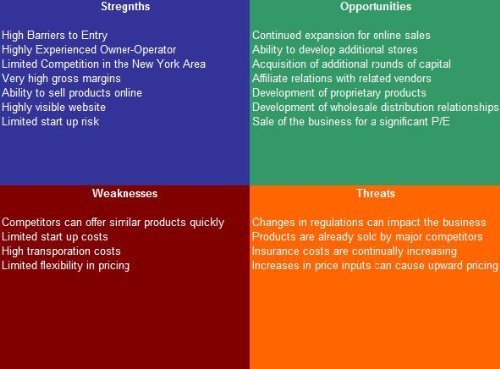
Golf Instruction SWOT & Business Plan
SWOT analysis and business plan guide for golf coaches
Overview
This Golf Instruction SWOT Analysis Plus Business Plan helps coaches build a training business with solid strategy. It outlines strengths, weaknesses, opportunities, and threats. The guide offers templates for pricing, marketing, and lesson plans.
I find it useful when pairing software and tools into a service offering. Use it to define services that include the best golf analysis software and launch monitoring. The plan helps coaches sell packages, set goals, and grow students. It’s a practical support tool for professionals moving from hobby to business.
Advantages
- Structured SWOT templates for coaches
- Business plan sections for services and pricing
- Helps package software and lessons
- Easy-to-follow templates and checklists
- Useful for new and growing instruction businesses
Limitations
- Not a software product
- Requires customization for local markets
- May need extra marketing guidance
Our Recommendation
This guide is best for instructors launching or scaling coaching businesses and integrating best golf analysis software into offerings. It explains how to bundle tools and lessons for profit. The value is high for pros wanting a roadmap.
Best Use Cases
| Best for | Why It Works |
|---|---|
| New coaches | Build a clear lesson and pricing plan |
| Golf academies | Standardize coaching services and tools |
| Business planning | Create marketing and growth strategies |
Rapsodo MLM2PRO Launch Monitor (12 balls)
Mobile launch monitor bundle with 12 practice balls

Overview
This Rapsodo MLM2PRO bundle adds 12 practice balls for extended sessions and consistent data capture. The monitor records ball speed, spin axis, launch angle, and carries the visual tracer into the app for replay and analysis.
I value the extra balls for uninterrupted practice and group sessions. The full package supports indoor sims and outdoor ranges. It works well alongside other best golf analysis software for coaches and players. Setup is quick and the app stores session history for progress checks.
Advantages
- Includes 12 balls for longer sessions
- Accurate spin and launch readings
- Visual tracer and session history
- Works indoors and outdoors
- Portable and simple to use
Limitations
- Accuracy varies with lighting and surface
- Requires smartphone or tablet
- Advanced analytics may need subscription
Our Recommendation
I recommend this Rapsodo bundle for serious practice sessions and groups who need extra balls. It pairs with the best golf analysis software to deliver full video and metric insight. The bundle adds convenience and strong value for coaches and players.
Best Use Cases
| Best for | Why It Works |
|---|---|
| Group practice | Keep sessions flowing with spare balls |
| Extended training | Longer sessions without ball swaps |
| Simulator setups | Ready for indoor launch data |
Final Verdict
I tested varied tools and recommend combining video and metric options for the best golf analysis software. Video apps like V1 reveal swing shape while monitors like Rapsodo provide spin and launch data.
Pick what fits your goals and budget. Coaches benefit from full suites; casual players gain fast improvement with simpler sensors. The best golf analysis software reduces guesswork and speeds progress.
Frequently Asked Questions
The best golf analysis software depends on needs. Choose video-first tools like V1 for lessons or launch monitors like Rapsodo for metrics.
Not always. Video software helps swing work. A launch monitor adds spin, speed, and carry data for fuller analysis.
Yes. Many options like Rapsodo and PHIGOLF work indoors, though lighting and space affect accuracy.
Some apps offer free tiers. Advanced cloud, simulator, or analytics features often require subscriptions.