How To Use A Wilson Golf Range Finder: Easy Setup And Tips
Place the eye on the viewfinder, lock the pin, and read the yardage—it's that simple.
As an avid golfer and gear tester with years of rangefinder use, I’ll walk you through how to use a Wilson golf range finder with clear steps, practical tips, and real-life lessons. Whether you bought a Wilson golf range finder for the first time or want to squeeze more accuracy from it, this guide covers setup, aiming, reading results, troubleshooting, and care. Read on to learn step-by-step instructions and pro tips that will help you lower scores and pace on the course.

How a Wilson golf range finder works
A Wilson golf range finder uses a laser to measure distance. Point the device at a target and the range finder times the laser’s return. The device then calculates yards or meters.
Most Wilson golf range finder models include features like single-measure mode, continuous scan, and sometimes slope compensation. These functions help you pick targets, lock on flags, and estimate adjusted yardages on slopes. Knowing how your Wilson golf range finder measures targets helps you trust the number it shows.
Typical output is a clear yardage reading and sometimes an indicator that the flag is locked. My experience shows that learning to steady your hands before you press the trigger improves consistency with a Wilson golf range finder.

Setting up your Wilson golf range finder
- Use the recommended battery type and insert it with correct polarity. A fresh battery avoids dim displays and slow responses.
Adjust the eyepiece
- Twist the eyepiece until the display text is sharp. This makes numbers easier to read and speeds up target identification.
Set units and modes
- Set yards or meters in the settings. Turn slope compensation on or off depending on the competition rules.
Pair with accessories
- Attach a lanyard or carry case. Keep the device handy during play and protect it between shots.
I test my Wilson golf range finder before every round. A short 30-second setup routine keeps it ready. Small setup steps yield big confidence gains on the tee.
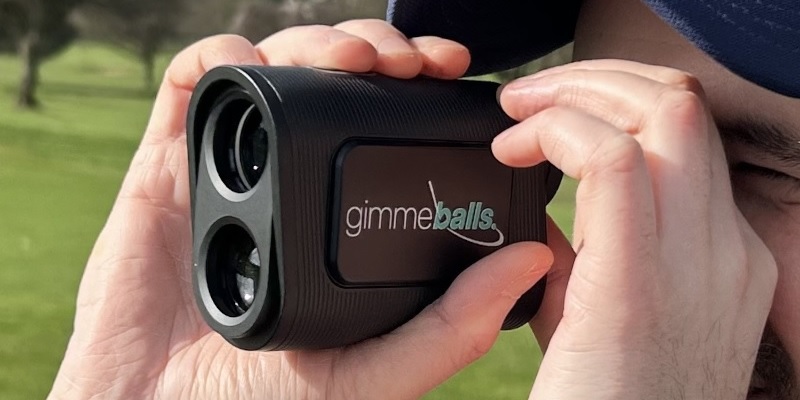
Step-by-step: Using a Wilson golf range finder on the course
- Hold and stabilize
- Grip the range finder with both hands and tuck your elbows in. A steady stance reduces wobble and improves lock time.
- Look through the eyepiece
- Aim at your target, such as the flag, bunker lip, or a tree. Align the crosshair or reticle with the target.
- Press the measure button
- Press once for a single reading. Hold the button for continuous scan mode to track moving targets or check multiple distances.
- Lock on the pin
- If the device has pin-lock, wait for the pin indicator. The readout will show the yardage to the flag.
- Read and react
- Note the yardage and decide on club selection. If slope compensation is enabled, use the adjusted yardage, unless playing a competition that forbids slope.
- Confirm with a second measure
- Re-measure quickly to verify. If numbers vary, aim for the lowest reliable reading to avoid hazards.
Personal tip: When a Wilson golf range finder returns inconsistent numbers, I step to a slightly different angle and remeasure. This often gets a cleaner line of sight to the flag.
Tips for accuracy and common mistakes
Watch for visual clutter
- Trees, rain, or background objects can pull the laser off the flag. Aim for the brightest reflection or a distinct edge.
Avoid shaky hands
- Use a rail, fence, or your bag for support. A stable stance improves the chance of a clean lock.
Use continuous scan for groups
- When you need to measure multiple points, continuous scan helps you quickly collect yardages.
Turn off slope during competition
- Many rulesets ban slope assistance during official play. Know the rules before you enable it.
Mind reflective surfaces
- Water or shiny objects can give false readings. Avoid pointing at reflections.
Common mistake I made early on was trusting the first reading without rechecking in tight conditions. Now, I habitually take two quick measures and use the more conservative number.

Troubleshooting your Wilson golf range finder
Dim or blank display
- Replace the battery and reseat it. Check for corrosion and clean contacts if needed.
No lock or slow lock
- Clean the lens. Practice steadying your posture and aim at a high-contrast target.
Inconsistent readings
- Check for obstruction, switch to a different angle, and ensure you use the correct mode. Verify with a known distance on the course.
Device not powering on
- Try a fresh battery and press firmly on the battery compartment. If it still fails, contact support for warranty options.
I once had a rain-soaked round where the Wilson golf range finder performed poorly. Drying the lens and keeping the device in a water-resistant pouch fixed the issue on the next hole.

Maintenance and care for longevity
Clean the lens gently
- Use a microfiber cloth. Wipe in straight lines to avoid streaks.
Store properly
- Keep the range finder in its case when not in use. Avoid extreme heat or cold.
Replace batteries
- Remove batteries for long storage. Check battery level regularly during season.
Service and warranty
- Register your product if the manufacturer offers registration. Use authorized service centers for repairs.
A few simple care actions add years to your Wilson golf range finder. Treat it like an important club: quick checks before each round make a difference.
Comparing Wilson golf range finder features and models
Range and accuracy
- Higher-end models offer longer range and tighter accuracy. Decide what range you need for your course.
Pin-lock and slope
- Some Wilson golf range finder models include pin-lock and slope modes. Choose based on local rules and your preference.
Price and build quality
- Entry-level Wilson golf range finder units are budget-friendly. Mid-range models often balance durability and features.
Battery life and display
- Look for clear displays and long battery life. Backlit screens help in low light.
I’ve tested different Wilson golf range finder models on short links and wooded parkland. For tight-tree courses, faster lock and good magnification mattered more than long-range capability.

PAA-style quick questions
What is the best way to aim a Wilson golf range finder?
- Aim at a high-contrast spot, like the flag or a marker. Hold the device steady and use any pin-lock feature for confirmation.
Can a Wilson golf range finder measure flag distance through trees?
- Laser rangefinders can struggle through foliage. Move to a clearer line of sight or measure to a visible landmark near the flag.
Should I use slope mode during casual rounds?
- Slope mode helps estimate uphill or downhill adjustments for casual play. Turn it off during official competition if rules prohibit slope.
How far can a typical Wilson golf range finder read?
- Many models read 400+ yards to reflective targets, but effective practical range is often less in real conditions. Check the model’s specs for exact numbers.
Is wind accounted for by a Wilson golf range finder?
- No, laser rangefinders measure distance only. Estimate wind effects separately when choosing a club or shot type.
Frequently Asked Questions of how to use a Wilson golf range finder
How do I lock onto the flag with a Wilson golf range finder?
Aim at the flag and hold still while pressing the measure button; wait for the pin-lock indicator before reading the yardage.
Do I need to calibrate my Wilson golf range finder?
Most Wilson golf range finder units do not require calibration, but check settings and perform a quick accuracy check against a known distance.
Can I use a Wilson golf range finder in tournaments?
You can use a Wilson golf range finder if rules allow; disable slope mode for most sanctioned competitions to comply with regulations.
How often should I replace the battery in my Wilson golf range finder?
Replace the battery when you notice dim displays or slower locks; in regular play, once a season or before long events is typical.
What should I do if my Wilson golf range finder gives inconsistent readings?
Clean the lens, recheck aim, and try from a different angle. If inconsistency persists, test against a fixed target and consider contacting support.
Is it OK to use a Wilson golf range finder in wet conditions?
Light rain is usually fine, but keep the device dry and use a protective pouch in heavy rain. Dry and clean the lens after exposure to moisture.
How accurate are Wilson golf range finder measurements?
Wilson golf range finder accuracy varies by model, but many provide yardage accurate to within one yard under good conditions.
Conclusion
Using a Wilson golf range finder is a simple skill that will make club selection easier and speed up your rounds. Set it up, steady your aim, use the right mode, and verify readings when conditions are tricky. Practice with it on the driving range to learn how readings match your real shot distances.
Take action today: bring your Wilson golf range finder to the next practice session and run a quick drill comparing rangefinder numbers to measured shots. Share your results, subscribe for more gear tips, or leave a comment about your experience.