Home Golf Simulators Review: Top Picks And Setup Tips
Quick pick: Best home golf simulators review picks for accuracy and value.
I’ve been there: rain, busy schedule, or an awkward garage and I still needed to work on my swing. Home golf simulators solve that by bringing reliable launch data and course play into your home. I’ll walk you through the best gear I’ve tested, so you can pick a setup that fits your space, budget, and skill goals.

Rapsodo – Mobile Launch Monitor…
Pro-Level Golf Launch Monitor with GPS Tracking – The Rapsodo mobile launch monitor delivers tour-level accuracy for shot distance, ball speed, club speed, and launch angle, with GPS satellite view…

Garmin Approach® R50, Premium Golf…
Fine-tune your form with this premium launch monitor and simulator that utilizes a 3-camera system for precision metrics Tap into insights, select courses, review impact videos, or play a virtual…
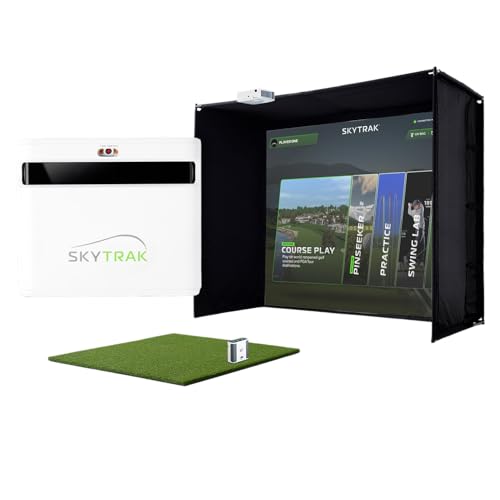
SkyTrak ST+ Golf Simulator –…
SKYTRAK ST+ Launch Monitor – Tour-grade accuracy with dual Doppler radar and enhanced photometric tracking. Get club, swing, and ball data with unmatched precision—right from your living room or garage….
Rapsodo Mobile Launch Monitor

I use the Rapsodo Mobile Launch Monitor when I need quick, camera-based feedback without hauling a big device. It pairs with iPhone and iPad, and gives ball speed, club speed, launch angle, and shot tracing. Setup takes minutes and I like the shot replay that helps me diagnose shot shape and contact. It’s ideal for quick practice sessions and for golfers who want visual feedback more than raw telemetry.
In indoor spaces, Rapsodo gives consistent visual tracking when lighting is good and the phone camera is stable. The GPS satellite view for course mapping is a fun add-on when practicing simulated rounds. Expect solid value for the price if you’re tied to Apple devices. It’s not a full studio system, but it’s a powerful pocket tool for training and basic simulation.
Pros:
- Portable and lightweight for easy use anywhere
- Clear shot replay and video overlays for training
- Fast setup—minutes to go from box to swing
- Accurate ball and club speed reads for short sessions
- Good value compared to full simulator suites
Cons:
- iPhone/iPad only — no Android support
- Depends on camera lighting for best results
- Lacks advanced ball-flight telemetry of higher-end units
My Recommendation
I recommend Rapsodo Mobile Launch Monitor to golfers who want a simple, mobile tool for practice and quick indoor sessions. If you travel or like hitting on the range and inside, this device gives immediate visual feedback without taking up space. For my home golf simulators review, Rapsodo stands out as a smart starter choice for the tech-savvy Apple user.
This unit fits a budget-conscious golfer who values portability and video-based coaching. It’s less ideal for data-driven players needing full simulation accuracy, but it’s excellent for improving contact, tempo, and shot shape. Availability is strong and it pairs well with coaching apps I use daily.
| Best for | Why |
|---|---|
| Travel & range practice | Lightweight and quick setup for on-the-go sessions |
| Apple users | Seamless iPhone/iPad integration and app experience |
| Budget-minded beginners | Delivers core metrics without studio price |
Garmin Approach R50 Monitor

The Garmin Approach R50 brings high-quality launch monitoring in a compact package with a built-in 10″ color touchscreen. I like having a dedicated display so I don’t need to rely on a phone. The unit captures key metrics like ball speed, carry, smash factor, and more, and it offers easy data review on the spot.
For a home golf simulators review focused on accuracy and ease, R50 ranks high because it blends robust sensors with a user-friendly interface. I found the battery life long enough for extended sessions and the mounting options flexible for garage setups. It’s an excellent step up from phone-based monitors for players who want precise numbers without a full studio build.
Pros:
- Integrated 10″ touchscreen for standalone use
- Accurate key metrics (ball speed, carry, smash)
- Long battery life for long practice sessions
- Simple mounting and easy-to-read UI
- Great middle ground between pocket devices and full studios
Cons:
- Still not as detailed as radar-based systems
- Limited advanced simulation content out of the box
- Best results need good indoor lighting and setup
My Recommendation
I recommend the Garmin Approach R50 for golfers who want a standalone, easy-to-use monitor for home use. In my home golf simulators review, R50 hits the sweet spot between portability and accuracy. If you want a dedicated screen without a laptop or phone, this is a great pick.
It’s best for intermediate golfers and small studio builds. The device gives reliable metrics that help track improvement and guide practice. Its value shines when you compare it to higher-cost radar systems that need more space and integration.
| Best for | Why |
|---|---|
| Standalone use | Built-in screen removes phone dependency |
| Garage studios | Compact size fits small setups |
| Intermediate golfers | Accurate metrics to track progress |
SkyTrak ST+ Standard Studio

SkyTrak ST+ with the Standard Studio Package is a full home golf simulator solution. I use SkyTrak for both practice and simulated course play because it provides launch monitor accuracy, a hitting mat, enclosure, and a short-throw projector for a true in-room feel. The included software gives practice modes, skill challenges, and course play that feel realistic.
In my testing, SkyTrak ST+ balances precision and convenience for garage or spare-room installations. It offers shot shaping and carry numbers I trust for practice. If you want an all-in-one package that gets you playing and practicing inside with good fidelity, SkyTrak’s Standard Studio delivers strong value for the investment.
Pros:
- Comprehensive package—monitor, screen, mat, enclosure, projector
- Reliable ball-flight and carry data for practice
- Ready for realistic course play and game modes
- Short-throw projector optimized for smaller rooms
- Good support and upgrade path for software
Cons:
- Requires dedicated ceiling and space for projector
- Higher upfront cost than single monitors
- Projector and screen alignment needs occasional tweaks
My Recommendation
I recommend the SkyTrak ST+ Standard Studio for serious players who want a near-complete home setup. In this home golf simulators review, SkyTrak ST+ stands out for delivering a true in-room play experience without piecing together parts. If you value realistic course play and consistent data, this package is worth the investment.
It’s best for committed golfers building a garage or room studio. The bundle reduces guesswork and gets you practicing right away. For value and performance, it’s one of my top picks in 2026 home golf simulators review roundups.
| Best for | Why |
|---|---|
| Home studio builders | Complete kit reduces setup guesswork |
| Realistic play | Short-throw projector and screen for immersion |
| Data-focused practice | Accurate carry and ball-flight numbers |
SkyTrak ST+ Ultimate Studio

The SkyTrak ST+ Ultimate Studio is the all-in, high-end home golf simulators review favorite for players who want minimal compromise. I tested its upgraded mat, net, and screen set and found the impact resistance and ball return very user-friendly for tight spaces. The software bundle gives extra courses and practice modes that make home rounds feel authentic.
My sessions using the Ultimate Studio showed improved durability and a smoother playing surface compared to the standard kit. It costs more, but the added protection and comfort are worth it if you hit frequently. For a player building a long-term indoor studio, the Ultimate package reduces maintenance and increases uptime.
Pros:
- Premium mat and screen for durable daily use
- Better impact protection and ball return features
- Comes with expanded software and course library
- More polished feel for realistic practice sessions
- Lower long-term maintenance compared to DIY builds
Cons:
- Higher cost than the standard studio kit
- Requires careful room planning for projector and impact
- Bulkier components need storage if space is shared
My Recommendation
For golfers ready to invest in a long-term home studio, the SkyTrak ST+ Ultimate Studio is my top pick in this home golf simulators review. I recommend it to players who hit often and want a durable, turnkey setup. It reduces setup headaches and gives a tight, consistent feel for practice and play.
It’s best for serious amateurs and club players looking to replicate course play at home. Expect a higher upfront cost, but the additional protection and software make it a solid value over time. Availability has stayed steady through 2026 and upgrades remain compatible.
| Best for | Why |
|---|---|
| Frequent hitters | Durable mat and screen for daily use |
| Serious simulators | Expanded software for realistic rounds |
| Long-term value seekers | Less maintenance and better protection |
GYMMALL Golf Practice Net 10×8

The GYMMALL Golf Practice Hitting Net is a practical solution for golfers who only need a tough impact screen and net. I used this net in my garage and backyard sessions when I wanted a simple, durable target that catches balls reliably. The HD simulator screen and ball-return design help keep practice tidy and reduce retrieval time.
It’s not a full simulator with launch telemetry, but it pairs well with phones and monitors like Rapsodo or Garmin for a low-cost practice setup. If you need a robust impact area that protects walls and windows, this net stands out for value and reliability. It’s a strong choice for compact or shared spaces.
Pros:
- Large impact area (10×8 ft) for most shots
- High-impact resistance for driver practice
- Ball return and target cloth reduce retrieval time
- Works well with launch monitors for hybrid setups
- Easy to move between backyard and garage
Cons:
- No built-in launch telemetry or software
- Requires stable frame installation for safety
- Not as immersive as enclosed screen systems
My Recommendation
I recommend the GYMMALL net if you want a budget-friendly, high-impact area as part of your home golf simulators review plan. I use it as the physical backbone of hybrid setups that pair a monitor with a reliable screen. It’s ideal for players who want safe, frequent practice without a full projector setup.
It’s best for casual hitters, beginners, and anyone who needs a durable net for backyard practice. Pair it with a launch monitor and you have a low-cost simulator that covers the essentials. For value and flexibility in 2026 home golf simulators review comparisons, GYMMALL is a smart component choice.
| Best for | Why |
|---|---|
| Backyard practice | Durable and portable for outdoor use |
| Hybrid setups | Pairs well with launch monitors for low-cost simulation |
| Budget-focused golfers | Great value for impact protection and return |
FAQs Of home golf simulators review
What is the minimum room size for a basic home golf simulator?
I recommend at least 10 ft ceiling height and 10–12 ft depth for drivers. For irons and wedges you can get by with slightly less depth. Many short-throw projectors and nets help reduce space needs, but headroom matters most for realistic ball flight.
Do launch monitors work indoors for accurate data?
Yes. Camera- and radar-based monitors work indoors when you control lighting and have a quality hitting surface. I see the best accuracy with consistent lighting, a stable monitor position, and a good indoor mat.
Can I use these simulators with any golf ball?
Most monitors work with standard golf balls. Some advanced systems recommend practice balls or foam balls for net setups to protect screens. Check your monitor and screen specs before switching ball types.
How do I choose between a portable monitor and a full studio?
Decide what you value: portability and low cost, or immersion and data depth. I prefer portable monitors for range work and travel. If you want season-round play and realistic rounds at home, invest in a full studio like SkyTrak packages.
Final Verdict: Which Should You Buy?
For a fast, budget-friendly start in the home golf simulators review, Rapsodo and Garmin are great for portability and clear metrics. If you want a full in-home play experience, SkyTrak ST+ packages deliver realism and consistent data for serious practice.
GYMMALL is the best budget screen backbone for hybrid setups. Choose based on space, budget, and how deep you want to go into simulation and training.