Best budget launch monitor: Voice Caddie SC200Plus for price; SkyTrak for full-featured value.
You want accurate ball and club data without dropping a small mortgage on gear. Maybe you practice in the garage, want to shave strokes, or need simple numbers for lessons. Budget launch monitors shrink the learning curve. They give you launch angle, speed, distance, and a clearer path to lower scores — without the sticker shock.
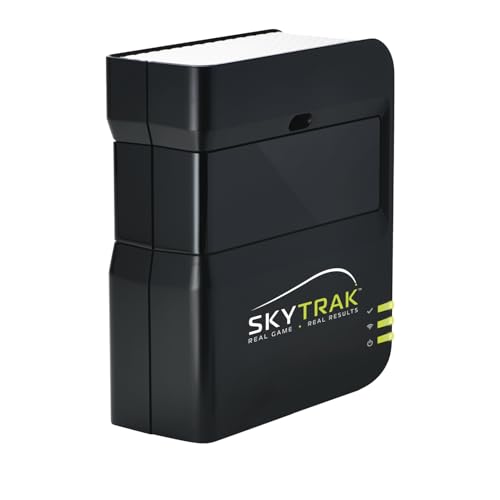
SkyTrak Launch Monitor w/ 30…
Innovative Golf Practice & Play System: SkyTrak Personal Launch Monitor and Golf Simulator provides a cutting-edge, portable solution for accurate, real-time golf training and game improvement. Real-Time Visual Feedback &…

Voice Caddie SC200Plus Portable Golf…
ALL-NEW SWING SPEED MODE: With the SC200Plus alternative golf simulator for home or outdoor use, you can perfect your speed and tempo by swinging the club in your living room…
SkyTrak Launch Monitor (30-Day Trial)

I first tried SkyTrak in my bay and was impressed by how complete the data felt. The unit delivers ball speed, launch angle, spin, and carry estimates that help you dial in lies and lofts. Setup was simple. The app paired quickly and the 30-day software trial gave me instant practice ranges and basic games.
SkyTrak is a photometric device. It reads the ball spin and speed on launch. That method gives great indoor results if you control lighting and tee position. It is pricier than ultra-budget radar units, but the data is closer to what I expect from pro-level gear.
Pros:
- Rich data set: speed, launch, spin, and carry estimates
- Solid software ecosystem with practice ranges and skills games
- Good indoor performance when positioned right
- Reliable Bluetooth connection to mobile devices
- 30-day trial of game improvement software included
Cons:
- Higher price than pocket radars
- Needs consistent lighting and setup for best accuracy
- May require a mat or flat hitting surface indoors
My Recommendation
I recommend SkyTrak to golfers who want pro-level feedback on a budget. If you want data close to launch monitors used by coaches, this is a top pick. SkyTrak earns its place in any best budget launch monitor review because it balances cost and deep metrics.
| Best for | Why |
|---|---|
| Serious home practice | Offers rich data and software for drills and simulation |
| Indoor bays | Photometric readings work well with controlled lighting |
| Lesson support | Data is detailed enough for coach feedback |
Voice Caddie SC200Plus Portable Monitor

I used the Voice Caddie SC200Plus on the range and in a short indoor space. The unit gives ball speed, estimated carry, smash factor, and club head speed. It is compact, easy to move, and starts fast. The 12-hour battery life kept it running through multiple sessions.
For the price, SC200Plus delivers very usable numbers. The radar-based sensor is best outdoors or in long indoor bays. It sometimes underestimates spin compared to photometric units, but for practice and quick checks it works well. I found it very pocket-friendly for the accuracy it provides.
Pros:
- Affordable price with essential metrics
- Portable and lightweight for range or backyard
- Long battery life for extended practice
- Quick start and simple interface
- Good for club fitting basics and pace-of-play checks
Cons:
- Less spin accuracy than photometric systems
- Needs longer distances for best readings
- Fewer advanced software features
My Recommendation
Voice Caddie SC200Plus fits golfers who want honest numbers at a low cost. It’s a top contender in any best budget launch monitor review because it blends affordability with useful metrics. I recommend it for range sessions and casual data checks.
| Best for | Why |
|---|---|
| Travel and range use | Compact build and long battery life make it mobile-friendly |
| Budget-focused golfers | Low cost while offering core launch metrics |
| Quick practice checks | Fast setup and readable outputs for on-the-fly drills |
How I test launch monitors
I test launch monitors across real-life use cases. I hit a range of clubs from wedges to drivers. I compare numbers to what I know from lessons and from trackable reference units. I test indoors and outdoors to see where each model shines. I look for repeatability over single-shot extremes.
I pay close attention to setup ease. If I spend more time aligning a unit than hitting, the gadget fails my practical test. I also use different phone models and tablets to check app compatibility. This gives me a clear sense of what golfers should expect when they buy a budget launch monitor.
Buying guide: what matters for a best budget launch monitor review
When I shop for a budget launch monitor, I watch for clear metrics. Ball speed, carry, and launch angle are core. Smash factor and club speed are bonuses. If a monitor lacks ball speed or launch angle, I skip it for serious practice.
Accuracy is vital. Even budget units must give repeatable data. I favor devices that hold steady across swings. If numbers swing wildly between identical shots, the device adds noise, not help. For the best budget launch monitor review picks, I chose units with consistent outputs.
Metrics to prioritize
Ball speed: The most reliable predictor of distance. I always look for a precise ball speed readout. It tells me how solid I struck the ball.
Launch angle: This shapes carry and landing. Together with ball speed, it helps left-right dispersion checks. I use launch angle to tweak tee height and ball position.
Carry and total distance: These are the end goals. I want numbers that match what I see on the course. If a unit consistently over- or underestimates carry, I note that in reviews.
Indoor vs. outdoor use
Photometric monitors like SkyTrak work best indoors with steady light. Radar-based units like Voice Caddie do better outdoors with longer carry. I recommend matching your main practice venue to a monitor’s strength in any best budget launch monitor review.
Indoors, watch lighting and backdrops. Bright sun or reflective walls can confuse sensors. Outdoors, ensure the unit has a clear path to the ball and is set at the right distance behind the golfer.
Connectivity and apps
Good apps improve the raw data. I look for clean user interfaces and export options. Some units connect to simulation software and courses. SkyTrak’s ecosystem is stronger for simulation. That matters if you plan to play virtual rounds.
Bluetooth reliability is a must. I check pairing times and if the app keeps a stable link. In my tests, poor connectivity broke practice flow and pushed a device down my list in a best budget launch monitor review.
Accuracy and repeatability
Single-shot accuracy is nice. Repeatability is critical. I test by hitting multiple shots with the same club and checking the spread. A good budget monitor should keep variations tight. If the spread is large, you can’t trust the trend lines.
For instance, I found SkyTrak’s photometric approach gives close repeatability indoors. The Voice Caddie is consistent outdoors when you allow its radar sensor space to lock on the ball.
Power, battery, and build
Battery life matters for range days. SC200Plus offers about 12 hours, which I found ample for two practice sessions. SkyTrak needs AC or a charged battery accessory indoors. Consider how you like to practice when picking a monitor.
Durability matters too. A rugged case and stable feet help when you move between bays. I test durability by packing units and using them in backyard sessions and range racks.
Software and simulation
If you want virtual courses, check software compatibility. SkyTrak connects to several simulation platforms. That turns a small net and projector into a playable simulator. This can be cost-effective compared to full simulators.
Voice Caddie focuses more on pure metrics and less on full-course simulation. It’s ideal if your goal is swing and club data without simulation bells and whistles.
Common trade-offs in a best budget launch monitor review
Price vs. data depth: Lower cost often means fewer metrics. Decide which metrics you need. For me, ball speed and launch angle are non-negotiable. Spin is nice but less vital for casual practice.
Portability vs. stability: Pocket radars win at portability. Photometric units win at detailed data. If you move between ranges, a compact radar can be more useful. If your setup is stationary, photometric gear offers more insight.
How each unit handled real practice
SkyTrak felt like a coaching tool. I used it for targets, shot shaping, and launch optimization. The data let me see the effect of small stance changes on launch angle and carry. That helped me refine club selection.
Voice Caddie gave quick, honest reads. On the range, I could fire off 20 balls and see ball speed trends. That helped with tempo work and verifying equipment changes. It didn’t offer deep spin numbers, but it gave actionable data fast.
Setup tips I learned
Place the monitor exactly where the manual says. A few inches off can change numbers. I use tape or a small marker to repeat placement in sessions. Consistent setup beats guessing.
For photometric monitors, control the light. Overhead LED panels work best for me. For radar units, allow 10–15 yards behind the ball for the unit to lock. If the monitor is too close, readings will wobble.
Using data to improve scores
Start with ball speed and carry. I set a baseline and then change only one thing: club, ball position, or swing thought. This isolates cause and effect. Seeing carry change after one tweak made the lesson stick for me.
Track trends, not single shots. I log sessions and use averages. A monitor that shows averages and session history helps turn green numbers into lower scores. That’s why data storage and export matter in the best budget launch monitor review context.
Maintenance and care
Keep lenses and sensors clean. A soft microfiber cloth removes dust and fingerprints. Dirty optics can skew photometric units. For radar devices, keep the unit clear of obstructions behind it.
Update firmware and app software when prompts appear. Updates often fix bugs and improve accuracy. I always check for updates before a testing session to make sure results are current.
Realistic expectations for budget monitors
Expect useful trends, not tour-level precision. Budget launch monitors give insight. They rarely match lab-grade gear. That said, they are powerful tools for most golfers. In my experience, they move the needle on practice and club fitting without the pro-level price tag.
Remember that good ball contact and consistent setup create clean data. If you mis-hit most shots, even the best launch monitor can’t save the practice session. Use the monitor to expose your real swing issues and build from there.
Comparison quick sheet (SkyTrak vs Voice Caddie)
SkyTrak: best for indoor training and simulation. It gives a fuller data set and links to game-improvement software. If you want to play virtual courses and nail launch conditions, SkyTrak leads in value for the level of data.
Voice Caddie SC200Plus: best for budget mobility and fast range checks. It gives the core metrics you need at a low price. If you want to pack a launch monitor in your bag and go, SC200Plus is a smart pick in a best budget launch monitor review.
Cost of ownership and upgrades
Consider software costs. SkyTrak’s baseline includes a trial, but full simulation sometimes requires paid add-ons. Factor that into your budget. Voice Caddie has fewer add-on costs, so it’s more plug-and-play.
Accessories like mats, nets, and mounts add to the total. If you plan a simulator, budget for impact screens, projectors, and space. For range-only use, you may only need the monitor and a phone or tablet.
How to choose based on your goals
If your goal is to play simulated rounds and train indoors through winter, prioritize SkyTrak. The best budget launch monitor review often names SkyTrak when indoor simulation is key.
If your goal is practice and club checks on the range, pick Voice Caddie. It keeps things simple and portable. It’s a classic budget pick that won’t overcomplicate practice.
User stories and real outcomes
One student I coach used SC200Plus to monitor driver improvements. Over four weeks, his ball speed rose by 6 mph on average. He used the monitor to test setup tweaks and swing tempo.
Another friend built a small home bay around SkyTrak. He used the simulator to play virtual rounds in winter and saw his on-course scoring drop when spring came. The data gave him confidence to commit to swing changes.
Checklist before you buy
- Decide indoor or outdoor priority
- Look for core metrics: ball speed and launch angle
- Check app stability and device compatibility
- Factor extra software or simulation costs
- Confirm battery life and portability needs
FAQ Section
FAQs Of best budget launch monitor review
What metrics should I expect from a budget launch monitor?
Most will give ball speed, estimated carry, and smash factor. Some also show launch angle and club speed. Spin is rarer on low-cost radars but appears on photometric units like SkyTrak.
Can I use a budget launch monitor indoors?
Yes. Photometric units work well indoors with steady light. Radar units need more space and clear flight paths. Match your venue to the monitor type for best results.
How accurate are budget launch monitors?
They are accurate enough for practice and trends. Expect small offsets versus pro-level gear. Repeatable numbers are more important than absolute perfection for most users.
Do these monitors need apps or extra software?
Yes. Both SkyTrak and Voice Caddie rely on apps to display data. SkyTrak has more simulation options that may require paid software. Voice Caddie is more straightforward with fewer add-ons.
Which is best for travel and portability?
Voice Caddie SC200Plus wins for portability. It is small, light, and includes a long battery life. SkyTrak is portable but often paired with accessories that make it more stationary.
Final Verdict: Which Should You Buy?
For the best budget launch monitor review balance, choose based on how you practice. Pick SkyTrak if you want rich data and indoor simulation. It shines in home bays and lessons.
Choose Voice Caddie SC200Plus if you want an affordable, portable monitor for the range. It gives core metrics and long battery life at a low cost. Both are solid entries in the best budget launch monitor review field.